Our sheet music reader was stuck, so we stopped improving it!
By early October our two readers had drifted far apart. On PDFs exported from notation programs, our optical music recognition (OMR) pipeline had become very accurate. But on clean scans of printed music, about one note in three was still wrong. Weeks of work had raised the PDF numbers. The scan numbers hadn't moved.
Why the PDF reader won
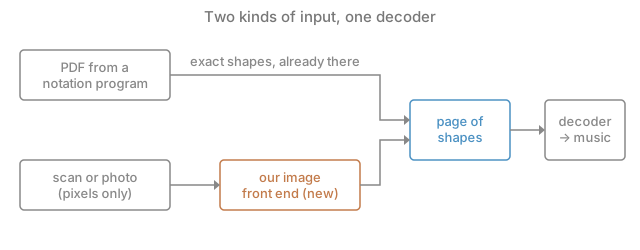
The gap had a simple cause. A PDF from a notation program still contains the music's drawing: every notehead, stem and beam is a shape with exact coordinates. The PDF reader never had to guess where anything was. It only had to work out what the shapes meant, and that part, the decoder, had become good.
A scan contains only pixels, so the scan reader had to do both jobs at once: find the shapes and interpret them. Every improvement to interpretation went into the PDF decoder and stayed there. The scan reader was a separate system that got none of it.
So we stopped improving the scan reader. We built an image front end with one job: turn pixels into the same page of shapes a PDF already gives us, and hand that page to the decoder that already worked. If it succeeded, everything we had learned on PDFs would apply to scans, and every future decoder fix would improve both.
Adding errors to clean pages
The risk was that a decoder tuned on perfect geometry would fall apart on the slightly wrong geometry any image reader produces. Before writing the front end, we measured how fragile the decoder was.
We took clean PDF pages and added errors to them on purpose, one kind at a time, then ran the normal decoder and scorer. This is a noise injection test (add controlled, known errors and watch how the output degrades). We wrote down the range we expected first, so a surprise in either direction would be noticed.
Three kinds of error:
- Symbol errors: we deleted about 2 % of noteheads, accidentals (sharps, flats, naturals) and rests, and invented about 1 % more.
- Symbol jitter: we moved every symbol by a random amount around a tenth of a staff space (the gap between two staff lines).
- Stem jitter: we did the same to the ends of stems and beams.
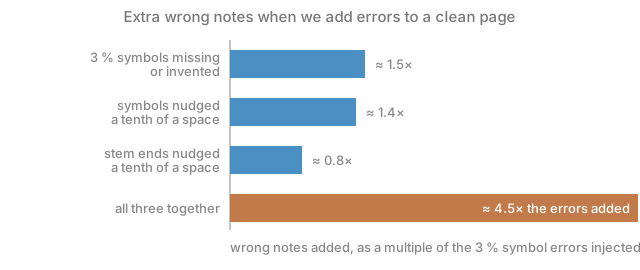
The decoder handled symbol errors well: errors in, roughly proportional errors out. The jitter surprised us. A nudge of a tenth of a space, too small to see and with no symbol missing, cost as much as the deleted symbols did. Combined, the three did more harm than their sum, and almost all page transcription scores dropped significantly.
Why a tiny nudge hurt
The decoder decided that a notehead belonged to a stem by checking whether their coordinates lined up within a tight tolerance. On a PDF they line up exactly, so the tolerance never mattered. Nudge both a little and some heads lost their stem. A chord whose heads no longer shared a stem was read as several notes in a row, the bar overflowed, and the error spread through the bar.
The survey by Rebelo and colleagues, Optical music recognition: state-of-the-art and open issues, describes how image-based readers connect symbols by topology (a head and a stem belong together because their ink touches), not by exact coordinates. So we kept the decoder as it was and made the front end responsible for topology. When it found a stem whose pixels touched some heads, it snapped the stem to those heads' edge, gave all heads of a chord one shared stem, and ended beams exactly on stems. PDFs were untouched, because they never pass through the front end.
Then we measured how much a real image reader jitters. We rendered PDFs to images and compared what the front end found with the exact shapes in the original file. At ordinary scan resolution, stem positions came out about five times tighter than the tenth of a space we had tested.
What real scans added
Rendered PDFs are the easy case. Real scans had problems our synthetic errors didn't cover, and we found and fixed them one at a time:
- Ragged edges. A scanned stem or bar line has a frayed edge. Removing the staff lines cut that edge into slivers that looked like tiny symbols, and a sliver stuck to a notehead made the head too wide to recognize. Cleaning up these edges let the front end read a large share of the symbols it had been skipping.
- Wrong teaching labels. We trained the small model that names each printed symbol using the PDF version of the same page as the answer key. Where the PDF parse had missed a staccato dot or a rest, the model learned that the real symbol was junk. The accuracy ceiling we kept hitting was partly the answer key being wrong.
- Slanted beams. Heavy, slanted beam stacks crossing staff lines were read as unknown blobs, so their sixteenth notes came out as quarters.
What we learned
The scan reader was never going to catch up by being tuned on its own. The useful move was to stop asking it to understand music at all, and ask it only to recover the drawing a PDF already has. That turned one hard problem into two smaller ones, and one of them was already solved.
The error test is the part we would repeat on any project. A few hours of adding errors to clean pages told us the decoder could live with missing symbols but not with small position errors, before we had written a line of the front end. Without it we would have built the front end first, watched it fail on scans, and spent weeks guessing why.