Examples

What converts well, what needs review, and how to upload a better source.

StaveWave can turn score PDFs and images into editable MusicXML, but source quality changes the review work. Use these examples to pick the best input and know where to check the output first.

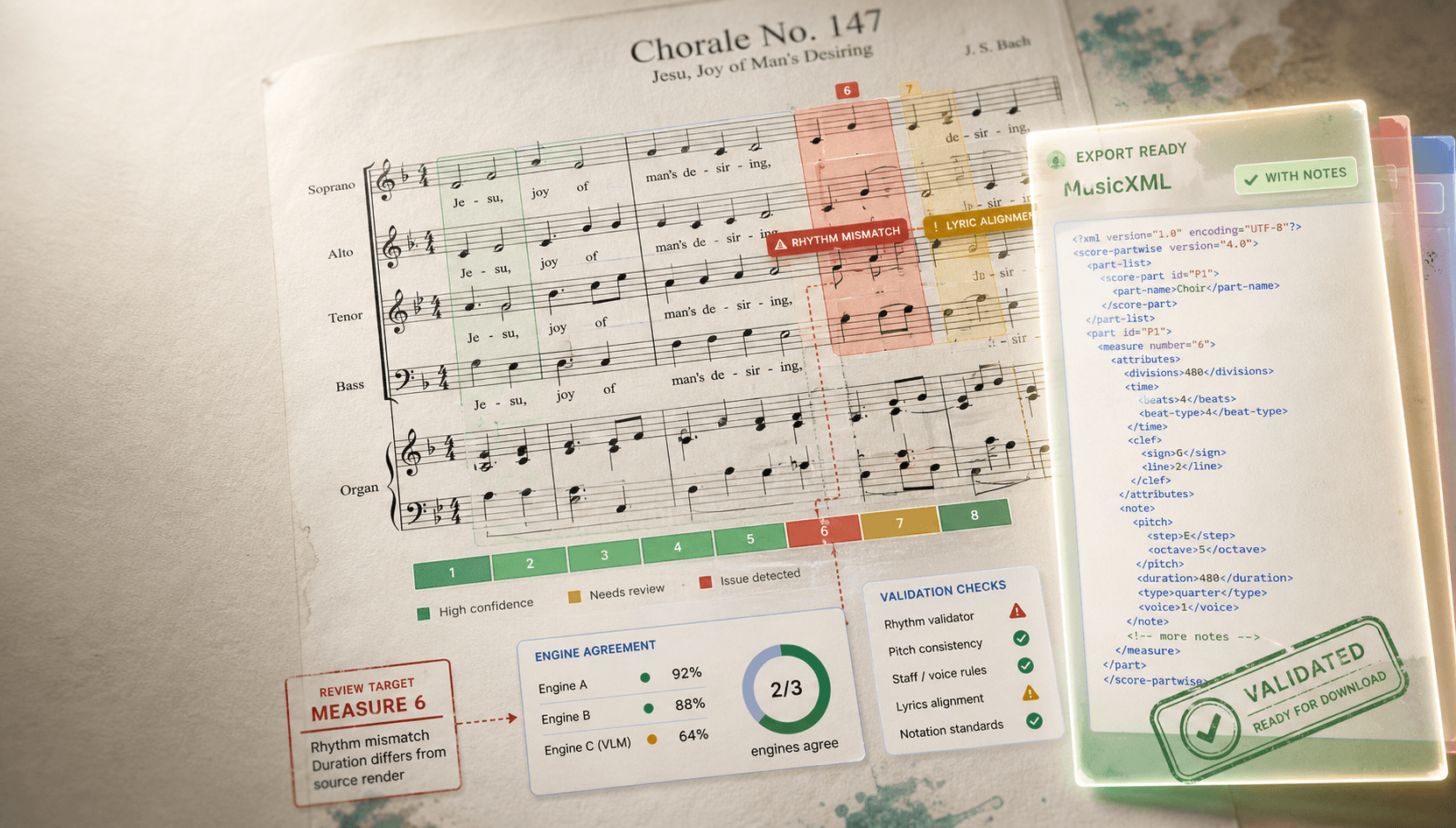
StaveWave sample report showing score recognition checks, confidence, and MusicXML export evidence.
Sample conversion report: source checks, OMR candidates, confidence notes, and MusicXML package.

Source examples

Pick the case that looks most like your score.

Each example shows the likely MusicXML usefulness and the first things to review after conversion.

Best starting point

Clean PDF exported from notation software

High

Vector or high-resolution PDF from Sibelius, Dorico, MuseScore, Finale, or a publisher.

Expected MusicXML
Usually produces the cleanest MusicXML structure, staff alignment, and rhythm totals.
Review first
Check repeats, volta brackets, lyrics, hidden voices, and any compressed cue-sized notation.
  • PDF
  • Full score or part
  • Lowest review time

Strong fit

Flatbed scan of a printed part

High

Straight 300 DPI scan with full margins, high contrast, and all systems visible.

Expected MusicXML
Works well for parts, hymns, lead sheets, and small ensemble pages with standard notation.
Review first
Spot-check page turns, system breaks, ties across lines, slurs, tuplets, and small text.
  • PDF, PNG, TIFF
  • Printed source
  • Moderate review

Usable when clean

Phone photo of a lead sheet

Medium

Bright, square-on photo where the page is flat and the staff lines are not warped.

Expected MusicXML
Can create a useful draft, especially for melody, chords, and simple rhythms.
Review first
Expect warnings around glare, shadows, skew, page curl, cropped measures, and handwritten marks.
  • JPG, PNG, WEBP
  • Single page
  • Retake if cropped

Possible, review-heavy

Dense piano-vocal or ensemble score

Medium

Multi-staff score with lyrics, dynamics, articulations, rehearsal marks, or divisi.

Expected MusicXML
Often useful as an editable draft, but staff grouping and voice assignment need attention.
Review first
Review multi-staff alignment, lyrics underlay, collisions, repeated sections, and instrument labels.
  • Multi-page PDF
  • Many staves
  • Focused cleanup

Try with caution

Old archive scan or low-contrast photocopy

Low

Aged paper, speckling, page shadows, broken staff lines, or scans from bound volumes.

Expected MusicXML
May still extract useful notation, but warnings and blocked measures are more likely.
Review first
Fix source quality first when possible; then inspect every flagged rhythm, pitch, and system break.
  • PDF or image
  • Historic source
  • High review time

Usually not ideal

Handwritten or heavily annotated music

Low

Manuscript notation, classroom markings, pencil edits, crossed-out bars, or nonstandard symbols.

Expected MusicXML
Printed notation can sometimes be read; handwriting and heavy markings often need manual entry.
Review first
Use the report to identify what was recognized, then compare against the original bar by bar.
  • Image or PDF
  • Nonstandard notation
  • Manual cleanup

Upload quality

Better source files create shorter cleanup sessions.

Before uploading, make sure the file gives the recognition engines the notation they need, not a puzzle caused by crop, blur, or glare.

Use this first

Original PDF

Start from the source PDF when you have it. A software-exported PDF usually preserves cleaner spacing and symbol shapes than a scan.

Good scan

300 DPI, flat, uncropped

Keep page edges, clefs, key signatures, system margins, and measure endings visible. Crop nothing important.

Good photo

Square, bright, glare-free

Photograph from above, flatten the page, avoid shadows, and retake anything with warped staff lines or clipped systems.

Review priority

Warnings are the worklist

Treat confidence notes as the edit queue: rhythm mismatches, pitch disagreements, and visual differences deserve the first pass.

What to expect

Use the conversion report to prioritize review.

SourceLikely resultReview focus
Notation-app PDFClean MusicXML draft with the fewest source-quality warnings.Repeats, lyrics, cue notes, hidden voices.
Flat scanGood draft when lines are straight and contrast is strong.Ties across systems, tuplets, slurs, page edges.
Phone photoUseful for simple pages when the photo is square and evenly lit.Glare, skew, crop, page curl, chord symbols.
Dense scoreEditable starting point with more measure-level review.Voice separation, staff grouping, lyrics, repeats.
ManuscriptBest treated as experimental unless notation is very clean.Every measure; compare against the original.

Sample report

The result points you to the bars worth checking.

A conversion is not just a file download. The report keeps measure confidence, validation warnings, and likely repair targets visible next to the MusicXML package.

M198%
M295%
M387%
M492%
M576%
M689%
Review notes
  • S3Measure 5 rhythm is short by half a beat; check for a missing augmentation dot.
  • S2Measure 3 has conflicting slur and articulation readings across recognition candidates.
  • S2Measure 6 chord symbols align, but lyric underlay needs a quick visual check.

After conversion

A practical review order for every example.

MusicXML is editable, so the fastest workflow is to fix the highest-risk notation first, then polish the rest inside your score editor.

  1. Open the MusicXML in your notation app and compare flagged measures first.
  2. Check rhythm totals before pitch details; missing dots and tuplets cause the loudest downstream errors.
  3. Review text, lyrics, chord symbols, dynamics, and articulations after notes and rests look right.
  4. For dense scores, scan vertically across systems to confirm staves stayed aligned.

Questions

Quick answers before you upload.

Which example type should I try first?
Use the original PDF if you have it. If you only have paper, use a flat, uncropped 300 DPI scan before trying a phone photo.
Can StaveWave handle full scores?
Yes, full scores can be converted, but dense multi-staff pages usually need more review than clean single parts.
Are phone photos supported?
Yes. Phone photos work best when the page is flat, bright, uncropped, and photographed straight on without glare.
What should I do after downloading MusicXML?
Import the MusicXML into your notation editor and review the measures named in the confidence notes before using the score.

Ready to test your source

Upload one score and see exactly which measures deserve review.

Try your scoreHow it works