Sheet music OCR

Sheet music OCR for reviewable MusicXML exports.

Turn scanned sheet music into editable MusicXML and see the OMR votes, specialist checks, and confidence notes that explain the result.

Optimized for sheet music OCR, optical music recognition, OMR software, music OCR workflows with reviewable MusicXML output.

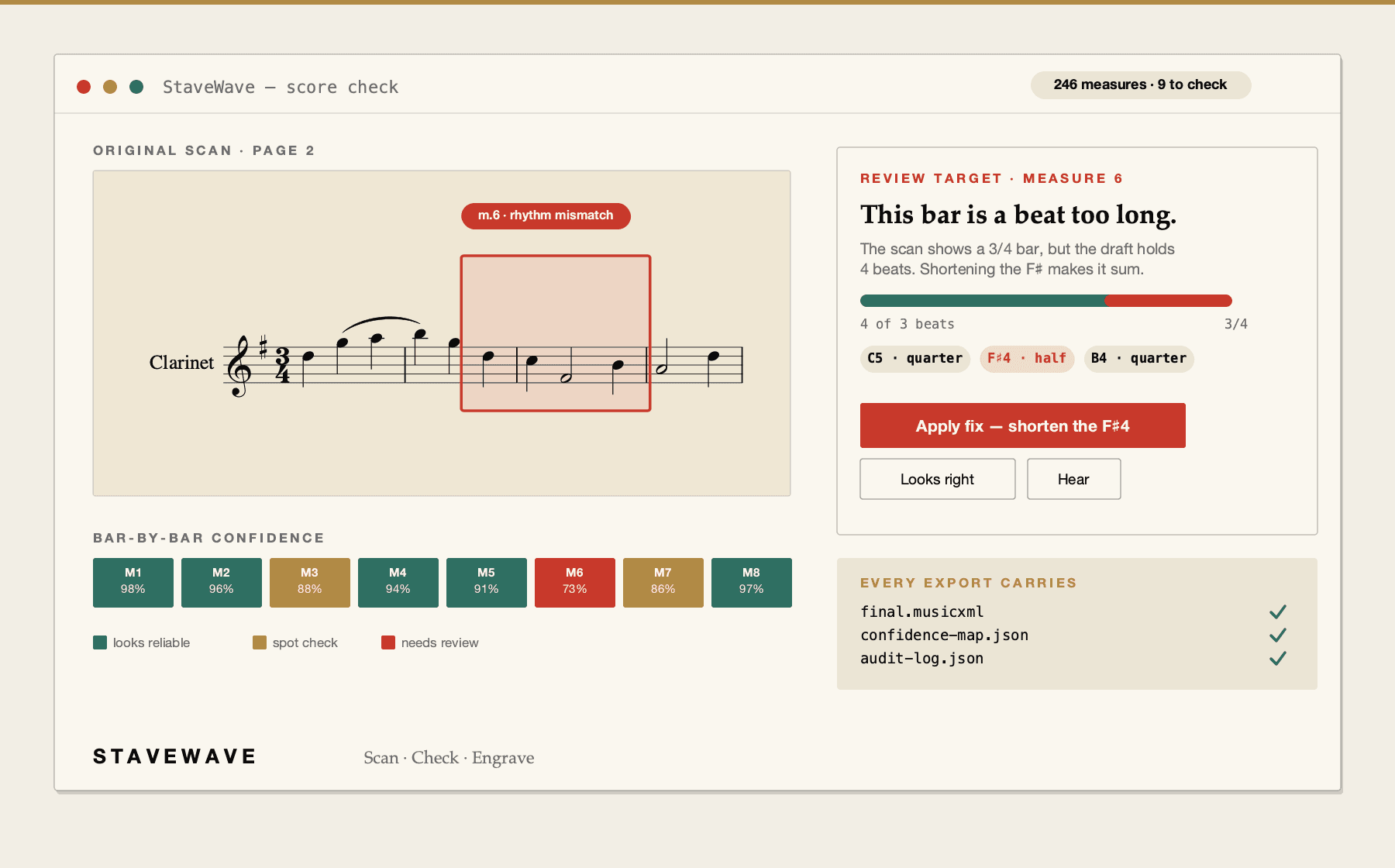
StaveWave sheet music OCR dashboard with score recognition and measure confidence.
Upload a score, review quality evidence, and export MusicXML.

Sheet music OCR benefits

Recognition with evidence

StaveWave treats sheet music OCR as a reviewable workflow, keeping engine votes, validation findings, quality checks, and weak spots visible.

Confidence by measure

Instead of hiding uncertainty, the conversion report points to measures where engines or validators found risk.

MusicXML for notation work

Export MusicXML for editing, arranging, cleanup, and import into common score-writing applications.

Processing stack

The recognition and validation layers behind each export.

StaveWave shows the recognition engines, specialist passes, validation checks, and quality gates involved so users can see what checked the score before trusting the MusicXML.

OMR engines

Recognition engines read the score and create MusicXML candidates.

Audiveris, homr, and oemer each try the notation independently. StaveWave compares their outputs and keeps disagreements visible instead of treating one reading as automatically correct.

Review checks

Review checks compare the source page with the rendered result.

Visual, corpus, and notation checks inspect weak spots, compare source evidence against rendered MusicXML, and flag suspicious measures or repair candidates.

Specialist checks

Specialist checks look for notation mistakes that matter in editing.

Focused passes review pitch, rhythm, text, structure, articulation, and style so the output is easier to clean up in Sibelius, Dorico, MuseScore, Finale, or another editor.

Quality gates

Release gates decide whether the export is ready or blocked.

Validation, consensus, visual comparison, audio checks, plausibility scoring, and audit evidence must run. If a required component fails, the job reports a blocking error.

Workflow

How StaveWave analyzes the upload.

01

Upload a scan

Use a PDF, PNG, JPG, WEBP, or TIFF score file up to 50 MB and 20 pages.

02

Inspect recognition

Review the status page as file checks, recognition engines, validation, and quality gates run.

03

Fix what matters

Use the review report to focus review time on measures with warnings or lower routing scores.

Questions

What to know before uploading.

These answers match the structured data search engines receive for this page.

Is sheet music OCR the same as normal text OCR?

No. Sheet music OCR, also called optical music recognition, reads notation symbols and exports structured music data.

Which image formats work?

StaveWave accepts PDF, PNG, JPG, WEBP, and TIFF files up to 50 MB and 20 pages.

Why include review notes?

Music notation mistakes can be subtle. Review notes help you find measures that deserve a closer look.

Ready to convert

Turn scanned sheet music into editable MusicXML and see the OMR votes, specialist checks, and confidence notes that explain the result.

Start sheet music OCRSee the demo